-
+
+
+
+
+
+
The below configuration will allow basic internet connectivity with focus on the magic sauce being the APN configuration. Where we have two options, those being:
Telstra Direct Internet:
cellular 0/2/0 lte profile create 1 telstra.internet
Telstra Corp Access: (requires a user to be setup in IPSS for Radius Auth) An /32 IP assigned and framed route that will be injected into BGP for consumption.
cellular 0/2/0 lte profile create 1 telstra.corp chap %username%@gprs.%domainname%.com.au %password%
interface Cellular0/2/0
ip address negotiated
ip nat outside << ONLY required on direct internet (telstra.internet)
dialer in-band
dialer idle-timeout 0
dialer-group 1
ipv6 enable
pulse-time 1
!
interface Cellular0/2/1
no ip address
shutdown
!
interface Vlan1
no ip address
shutdown
!
interface Vlan10 << Can be an SVi or Physical interface
ip address 10.10.10.1 255.255.255.0
ip nat inside << ONLY required if NAT is being used on direct internet
!
ip nat inside source list 1 interface Cellular0/2/0 overload
ip route 0.0.0.0 0.0.0.0 Cellular0/2/0
!access-list 1 permit any
dialer-list 1 protocol ip permit -
+
+
+
+
+
+
Just in case you need to extract those passwords from mRemoteNG. Just use the External tools as per the below.
- Open mRemote and go to “Tools” > “External Tools”
- Right-click in the white space and choose “New External Tool”
- In the External Tools Properties, fill in a “Display Name”, “Filename” and some “arguments”.
In this scenario I filled in"Password lookup",CMDand"/k echo %password%". - Go to the connection where you would like to reveal the connection and right-click on it and choose “External tools” > “Password lookup.
-
+
+
+
+
+
+
There are four ways to distribute a default route in BGP.
Three of them, the network 0.0.0.0, the default-information originate and redistribution from another routing protocol, are all similar in the resulting effect: they will inject the default route into BGP RIB and it will be advertised to all BGP neighbors. The difference is in the origin of the default route that is injected into BGP. Specifically:
- network 0.0.0.0 will inject the default route into BGP only if the default route is currently present in the routing table.
- redistribution will inject the default route into BGP only if the default route is currently present in the routing table and if it has been learned by a specific source protocol we are redistributing from.
- default-information originate causes the default route to be artificially generated and injected into the BGP RIB, regardlessly of whether it is present in the routing table. The newly injected default will be advertised to all BGP peers (because it now resides in the BGP RIB)
The fourth method:
- neighbor X.X.X default-originate is similar to the default-information originate in that the default route is “artificially generated” (it does not need to be present in the routing table in order to make the advertisement effective)*.
- However, the neighbor X.X.X.X default-originate is different from the the default-information originate in that the default route will be advertised only to this specific BGP neighbor and not to all existing BGP neighbors as with the previous approaches. The default route will not be installed in the BGP RIB of the router that is configured with the neighbor X.X.X.X default-originate command and so it won’t be generally advertised to all BGP neighbors.
*By doing the ‘default-originate’, you request a routerA (provider A) to send a route 0.0.0.0/0 via BGP out to RouterB (customer B).This is useful in many cases where customer B doesn’t really want toaccept a full BGP feed(for example in stub autonomous systems).
-
-
+
+
+
+
+
+
LWAPP Data Packets: UDP 12222
LWAPP Control Messages: UDP 12223CAPWAP Control: UDP 5246
CAPWAP Data: UDP 5247WCP for WiSM: UDP 10000
Mobility Control Messages: UDP 16666 and/or UDP 16667 (secure-mode)
Mobility EoIP Tunnel: IP Protocol 97 -
+
+
+
+
+
+
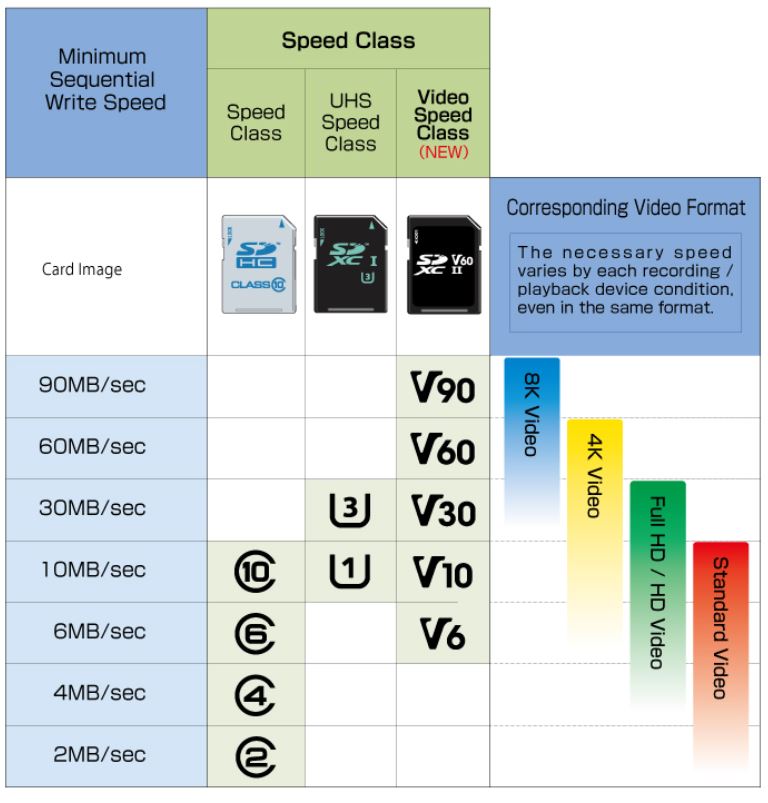
A quick overview on the differnet MicroSD Cards, read/write performance.
UHS SD Cards: Overview & Speed Tests
-
+
+
+
+
+
+
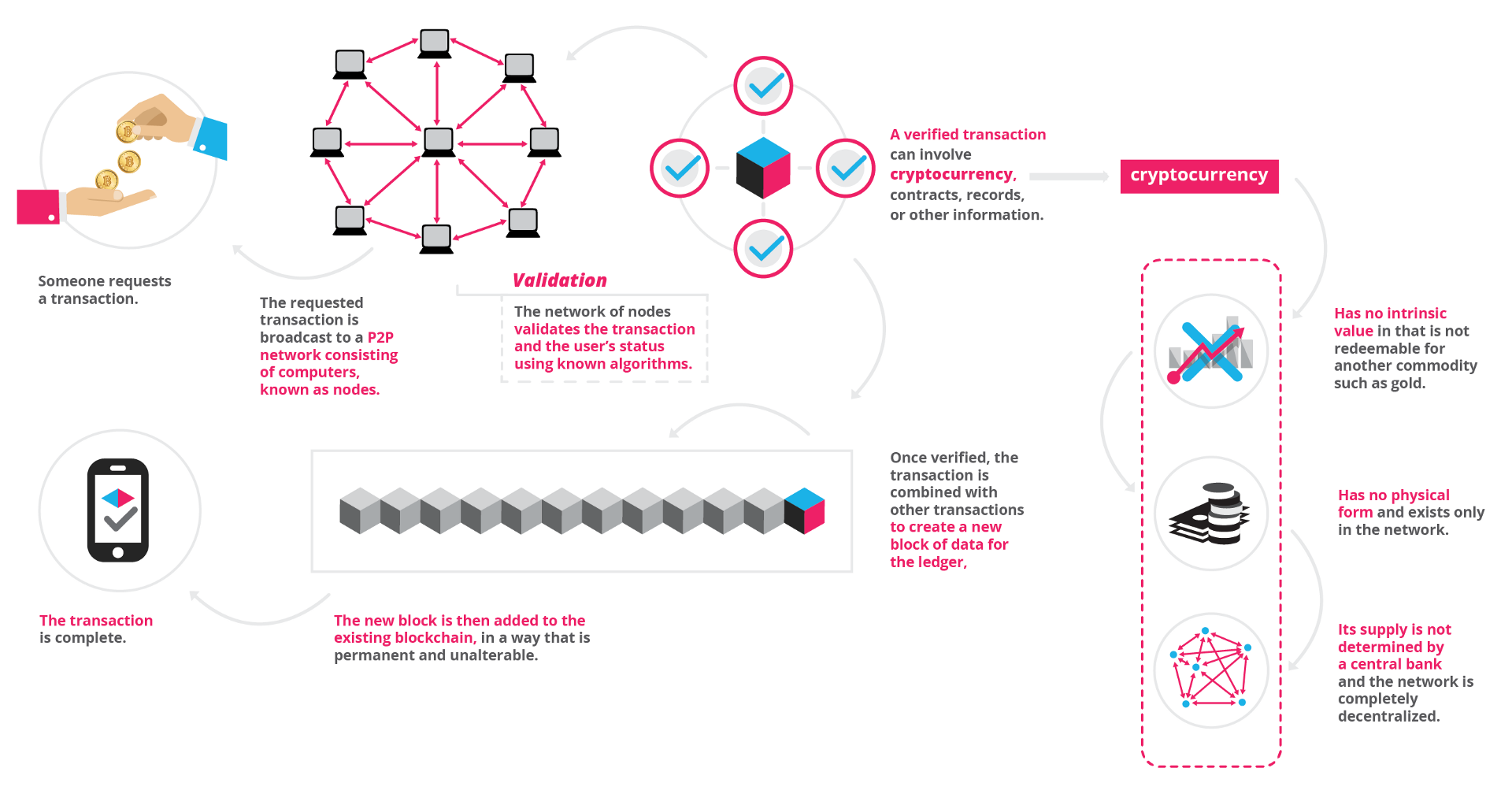
Here’s a good graphic that explains what it’s all about – Mine on!
-
+
+
+
+
+
+