MystaJoneS

If you're not making mistakes, then you're not doing anything.


  • 🔧 1. Legacy Applications and Systems

    • Many mining environments still use legacy ERP, SCADA, or other operational systems that depend on traditional AD for authentication and cannot integrate directly with Entra ID.
    • Examples include:
      • Old Windows services or servers using NTLM/Kerberos
      • On-premise SQL Servers tied to domain accounts
      • Equipment management software that doesn’t support modern auth

    🛠️ 2. Industrial Control Systems (ICS) and OT Environment Integration

    • Operational Technology (OT) in mining sites may not be internet-facing and often relies on air-gapped or isolated domains.
    • Integrating Entra ID directly into these environments is risky or impractical due to:
      • Limited or no cloud access from OT networks
      • Strict regulatory requirements
      • Need for real-time, local authentication with low-latency

    🧰 3. Group Policy and Local Machine Management

    • Group Policy Objects (GPOs) are still only available via on-prem AD, not Entra ID.
    • This is crucial for:
      • Controlling security settings
      • Device configuration for domain-joined Windows machines
      • Managing shared resources (e.g., file servers, print services)

    🔐 4. Kerberos Authentication and Advanced Access Controls

    • Some mining systems require Kerberos authentication, which Entra ID does not support in the same way as AD.
    • On-premise AD allows for:
      • Delegated authentication
      • Fine-grained service account permissions
      • Trust relationships between domains (for joint ventures, etc.)

    🚧 5. Site Reliability and Offline Operation

    • Remote mining sites can suffer from limited or unreliable internet connectivity.
    • On-prem AD ensures:
      • Continued user and service authentication during outages
      • Access to local resources even if the cloud is unreachable
      • Independence from cloud-based identity during network failure

    🧾 6. Compliance, Audit, or Sovereignty Requirements

    • Some mining companies are subject to Australian data sovereignty, ISO, or other compliance requirements that mandate local identity controls.
    • On-prem AD supports:
      • Centralized audit logging
      • Custom security models aligned with internal policies
      • Easier integration with local SIEM and compliance tools

    🛤️ 7. Hybrid Model is Often the Best Fit

    • Most mining companies today operate in a hybrid identity model:
      • On-prem AD + Entra ID via Entra Connect (Azure AD Connect)
      • Use Entra ID for M365, SaaS apps, and mobile workers
      • Retain AD for core infrastructure, OT, and reliability

    Summary Table

    ReasonOn-Prem ADEntra ID
    Legacy apps support
    GPO support
    OT/ICS integration
    Offline operations
    Kerberos authentication
    Modern cloud-based services
    Mobile workforce & SaaS auth
    Zero Trust & Conditional Access

    If you’re modernising, the goal should be to minimize reliance on on-prem AD over time — but in mining, it’s rarely safe or practical to eliminate it entirely without a long and careful transition, especially in sites where uptime and legacy system integration are critical.

    +
  • Docker images:

    ip addr add 10.0.0.10/24 dev eth0
    ip route add default via 10.0.0.10

    FortiGate images:

    comfit system interface
    edit port1
    set ip 10.0.0.11 255.255.255.0
    set allowaccess ping https ssh
    end

    Palo Alto images:

    # set deviceconfig system type static
    # set deviceconfig system ip-address 10.0.0.12 netmask 255.255.255.0 default-gateway 10.0.0.1
    # commit

    + ,
  • If your eve-ng web concole can not login, try one of these ways:

    1. To fix permission, enter this command in eve-ng console or ssh “/opt/unetlab/wrappers/unl_wrapper -a fixpermissions”

    2. Check the avalability of your eve-ng HD using “df -h” and chek wether the disk is full. If it is full, expand the HD by create new SCSI card drive in VM Ware.

    3. Fix eve-ng SQL database using “unl_wrapper -a restoredb” in your eve-ng console or ssh.

    + ,
  • I ran into some curly ones with eve-ng. Basically, I had to do the following:

    On Windows under core isolation turn off memory integrity

    Run the following (As admin) bcdedit /set hypervisorlaunchtype off

    Restart and this will allow you to use the processor virtualistion within VMware that is required.

    +
  • Quick setup guide. First we start by setting up the environment

    Setup Git https://github.com/git-guides/install-git

    Install Pythonhttps://www.python.org/downloads/

    Get Docker Desktophttps://www.docker.com/products/docker-desktop/

    Get and OpenAI API Keyhttps://platform.openai.com/account/api-keys

    Next we Clone the Repo

    Run the following once the above has been carried out.

    cmd > git clone https://github.com/Torantulino/Auto-GPT

    Navigate into the Auto-GPT directory

    cmd > cd Auto-GPT

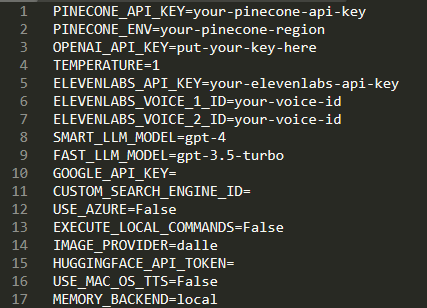
    Edit the .env.template file and insert your OpenAI API Key variable into line no. 3

    Save the modified file as .env

    Install Python libraries

    cmd > pip install – requirements.txt

    Start the Docker

    After Docker is installed run the following command to start Docker

    cmd > docker run -d -p 80:80 docker/getting-started

    you should see something like this (I’m running this test version on Windows)

    Here’s where the fun starts:

    Run python scripts/main.py and follow the terminal prompts. (%Path%/Auto-GPT/scripts/main.py)

    You can choose between a fully autonomous continuous mode or manual approval of each action.

    For continuous mode, run this: cmd > python scripts/main.py –continuous

    (If that’s all too hard, use this Browser based version https://agentgpt.reworkd.ai/ and supply your own API key ;))

    Enjoy!!

    +
  • Add an Environment Variable

    Select “New…” under “System variables”

    Input the text below and select “OK

    Variable name: OPENSSL_ia32cap

    Variable value: ~0x200000200000000

    Confirm that the variable has been added successfully, then select “OK

    Enjoy

    +
  • + ,
  • The below configuration will allow basic internet connectivity with focus on the magic sauce being the APN configuration. Where we have two options, those being:

    Telstra Direct Internet:

    cellular 0/2/0 lte profile create 1 telstra.internet

    Telstra Corp Access: (requires a user to be setup in IPSS for Radius Auth) An /32 IP assigned and framed route that will be injected into BGP for consumption.

    cellular 0/2/0 lte profile create 1 telstra.corp chap %username%@gprs.%domainname%.com.au %password%

    interface Cellular0/2/0
    ip address negotiated
    ip nat outside  
    << ONLY required on direct internet (telstra.internet)
    dialer in-band
    dialer idle-timeout 0
    dialer-group 1
    ipv6 enable
    pulse-time 1
    !
    interface Cellular0/2/1
    no ip address
    shutdown
    !
    interface Vlan1
    no ip address
    shutdown
    !
    interface Vlan10  
    <<  Can be an SVi or Physical interface
    ip address 10.10.10.1 255.255.255.0
    ip nat inside   
    <<  ONLY required if NAT is being used on direct internet
    !
    ip nat inside source list 1 interface Cellular0/2/0 overload
    ip route 0.0.0.0 0.0.0.0 Cellular0/2/0

    !access-list 1 permit any
    dialer-list 1 protocol ip permit

    +
  • Just in case you need to extract those passwords from mRemoteNG.  Just use the External tools as per the below.

    1. Open mRemote and go to “Tools” > “External Tools”
    2. Right-click in the white space and choose “New External Tool”
    3. In the External Tools Properties, fill in a “Display Name”, “Filename” and some “arguments”.
      In this scenario I filled in "Password lookup", CMD and "/k echo %password%".
    4. Go to the connection where you would like to reveal the connection and right-click on it and choose “External tools” > “Password lookup.
    +
  • There are four ways to distribute a default route in BGP.

    Three of them, the network 0.0.0.0, the default-information originate and redistribution from another routing protocol, are all similar in the resulting effect: they will inject the default route into BGP RIB and it will be advertised to all BGP neighbors. The difference is in the origin of the default route that is injected into BGP. Specifically:

    • network 0.0.0.0 will inject the default route into BGP only if the default route is currently present in the routing table.
    • redistribution will inject the default route into BGP only if the default route is currently present in the routing table and if it has been learned by a specific source protocol we are redistributing from.
    • default-information originate causes the default route to be artificially generated and injected into the BGP RIB, regardlessly of whether it is present in the routing table. The newly injected default will be advertised to all BGP peers (because it now resides in the BGP RIB)

    The fourth method:

    • neighbor X.X.X default-originate is similar to the default-information originate in that the default route is “artificially generated” (it does not need to be present in the routing table in order to make the advertisement effective)*.
    • However, the neighbor X.X.X.X default-originate is different from the the default-information originate in that the default route will be advertised only to this specific BGP neighbor and not to all existing BGP neighbors as with the previous approaches. The default route will not be installed in the BGP RIB of the router that is configured with the neighbor X.X.X.X default-originate command and so it won’t be generally advertised to all BGP neighbors.

    *By doing the ‘default-originate’, you request a routerA (provider A) to send a route 0.0.0.0/0 via BGP out to RouterB (customer B).This is useful in many cases where customer B doesn’t really want toaccept a full BGP feed(for example in stub autonomous systems).

    + , , , ,