Running a dual link configuration to ensure no SPOF using BGP and EIGRP.

If you're not making mistakes, then you're not doing anything.
+
+
+
+
+
+
Running a dual link configuration to ensure no SPOF using BGP and EIGRP.
+
+
+
+
+
+
Because my brain and eyesight are failing fast, i have to write it down nowadays, here’s a very basic BGP configuration with 3 different Autonomous System (AS) Numbers.

+
+
+
+
+
+

+
+
+
+
+
+
Basic config for a BGP Peer Group within an AS 123 and some iBGP routers. The config uses peer-group and route reflectors which saves you a lot of configuration on all the iBGP devices.
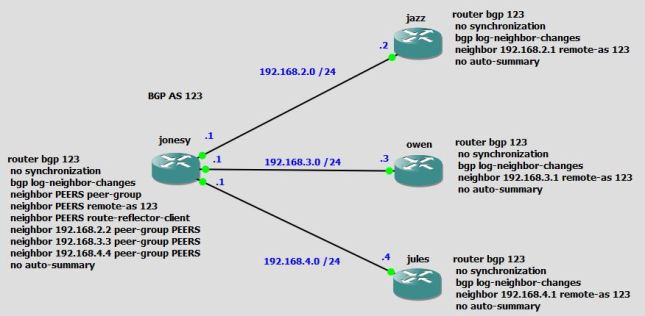
+
+
+
+
+
+
Over the weekend i was forced to replace the old 7200 rpm 1Tb HDD on the Mac. My first thoughts were, where do I start ? After doing a little research it all came down to suction cups; required to remove the front glass cover, as it’s held on with magnets (what the…but a slick design). Once that was done you’re pretty much inside. HDD replaced with a Samsung Pro 512Gb… Zoom, zoom….

Here are a few guides that helped me out.
+
+
+
+
+
+
I decided to use cisco’s EEM Scripting Engine to activate and deactivate the cellular interface to support a Primary link failure of our MPLS Link combined with an IP SLA:
ip sla auto discovery
ip sla 100
icmp-echo 1.1.1.1 source-interface GigabitEthernet0/1
threshold 1000
frequency 15
ip sla schedule 100 life forever start-time now
EEM Scripts
event manager applet Activate-3G
event track 60 state down
action 1 cli command “enable”
action 2 cli command “configure terminal”
action 3 cli command “interface cellular0/1/0”
action 4 cli command “no shutdown”
action 5 cli command “end”
action 99 syslog msg “Primary Link Down – Activating 3G interface”
event manager applet Deactivate-3G
event track 60 state up
action 1 cli command “enable”
action 2 cli command “configure terminal”
action 3 cli command “interface cellular0/1/0”
action 4 cli command “shutdown”
action 5 cli command “end”
action 99 syslog msg “Primary Link Restored – Deactivating 3G interface”
Stateful Failover for IP Security (IPsec) allows a router to continue processing and forwarding IPsec packets after a planned or unplanned outage occurs. A backup (secondary) router automatically takes over the tasks of the active (primary) router if the active router loses connectivity for any reason. This process is transparent to the user and requires neither adjustment nor reconfiguration of any remote peer.
It should be transparent but due to the nature of the configuration we had to apply the Stateful Failover to the Standby.
+
+
+
+
+
+
+
+
+
+
+
+
SSH provides an encryption shell to prevent snooping by unwanted parties and authentication. SSH shell sessions are encrypted, whereas Telnet is in clear text. Passwords and any data transferred from a user accessing a device is private and not easily viewable.
The following configurations are used to enable SSH on a device:
Cisco IOS access router
hostname access-router
ip domain name ese.cisco.com
!
cry key generate rsa general-keys modulus 1024
!
ip ssh version 2
ip ssh time-out 60
ip ssh authentication-retries 2
ip ssh source-interface GigabitEthernet0/1
!
line vty0 15
Transport input ssh
Cisco Catalyst switch
hostname catalyst-switch
ip domain name ese.cisco.com
!
cry key generate rsa general-keys modulus 1024
!
ip ssh version 2
ip ssh time-out 60
ip ssh authentication-retries 2
ip ssh source-interface Vlan193!
!
line vty 0 15
Transport input ssh

