MystaJoneS

If you're not making mistakes, then you're not doing anything.

  • Some information on how to configure multiprotocol extended Border Gateway Protocol (MP-EBGP). Extended BGP allows for the transport of routing information for multiple network layer protocols IPv6, VPNv4, and others. MP-BGP allows you to have a unicast routing topology different from a multicast routing topology, which helps to control the network and resources.

    In this example, the R1 and R3 routers are configured to be in AS 5500 forming iBGP. The R2 router is configured to be in AS 6500. The R1 and R2 routers communicate with each other using MP-EBGP.

    MP-BGP Config

    + , ,
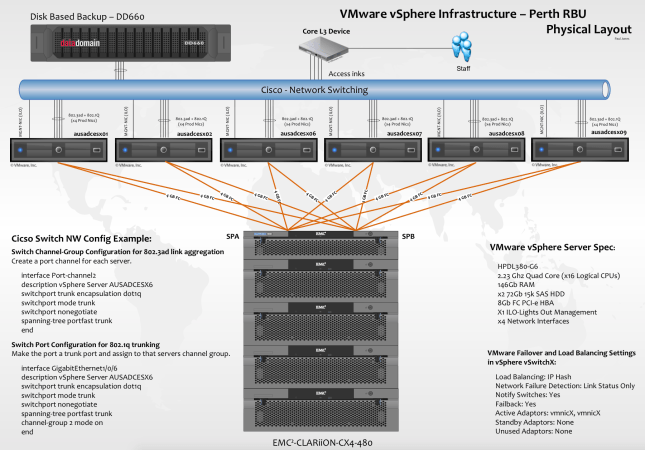
  • Configuration I designed some years back running VMware, EMC and DataDomain with some good old Cisco networking.  Pretty nice setup, if i don’t say so myself.

    Screen Shot 2015-01-05 at 7.35.17 pm


    Cisco switch config supporting 802.3ad and 802.1q.

    + ,
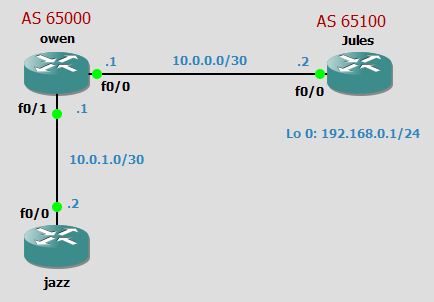
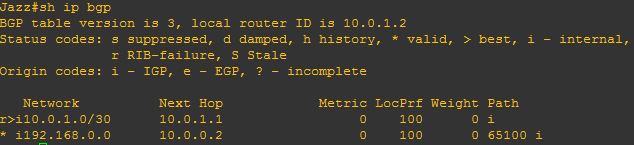
  • From the below you can see the next hop for 192.168.0.0 network is 10.0.0.2 which is outsite of 65000 AS, and router jazz doesn’t have a route to it.  BGP will not put 192.168.0.0 into routing table because it doesn’t know how to reach next hop, you can see this below:

    BGP-Next Hp Self 2

    BGP-Next Hp Self 3

    BGP-Next Hp Self 4

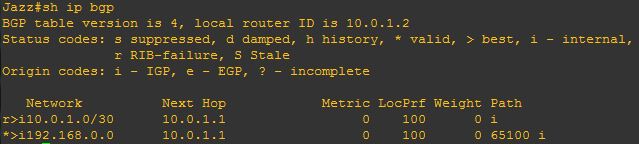
    By adding the next-hop-self command on the router owen it will change the next-hop attribute for external networks that will be advertised to the router Jazz:

    owen(config-router)#neighbour 10.0.1.2 next-hop-self

    BGP-Next Hp Self 4.5

    This changes the next hop attribute from 10.0.0.2 to be 10.0.1.1 on the router owen

    BGP-Next Hp Self 5

    from Jazz you can now ping (192.168.0.1) on Jules.

    BGP-Next Hp Self 6

    Job done!

    +
  • Loading a topology in GNS3 can consume a massive amount of CPU.  To decrease the CPU usage and make the GNS3 experince bearable i carried out the following steps:

    Load a Router/IOS >  Start it and open a terminal.

    At this point select the Idle-PC value and let the PC decide the option for each IOS image independently.  I did this for each IOS, i also changed the Idlemax value = 100 too. Idle-PC Value

    + ,
  • The below shows a basic configuration for a tunnel between the routers Jazz and Jules. In this instance router owen does not see the communication between jazz and jules.

    Basic Tunnel

    +
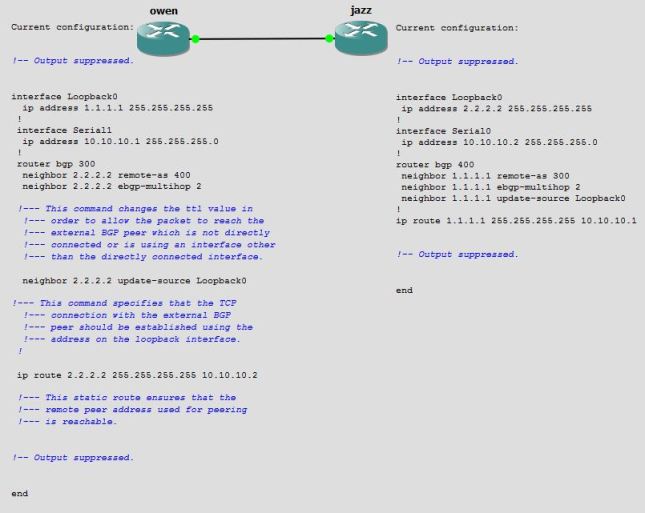
  • You can also configure eBGP using a loopback address (or any other operational interface) as shown in this section. Loopback interfaces are used in this manner to guarantee reachability in networks with multiple paths as shown in the Load Sharing Using the Loopback Address as a BGP Neighbor section of Load Sharing with BGP in Single and Multihomed Environments: Sample Configurations.

    eBGP Config with a loopback


    + , ,
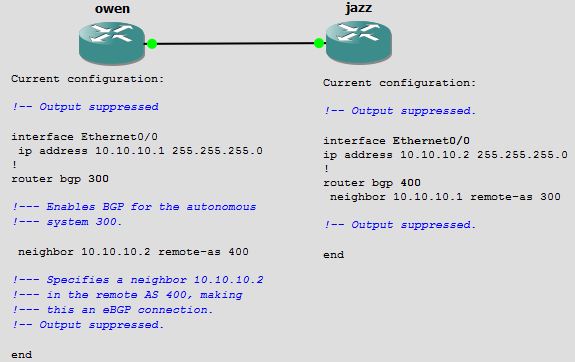
  • In this configuration, the router owen is in AS 300 and Router jazz is in AS 400.

    eBGP Config

    Peers must be directly connected when using eBGP.  If they are not directly connected, the neighbor ebgp-multihop command must be used and a path through an IGP or static route to reach the peer must exist in order for the routers to establish neighbor relationship. In the configuration above, owen router belongs to AS 300 while jazz router belongs to AS 400.

    + , ,
  • In this configuration, both routers are in AS 400.

    iBGP Config

    + , ,
  • Just came across some useful info from these BGP Case Studies.

    + ,
  • I’m a big fan of SLB, regardless of the technology, Cisco, Alteon, F5…..whatever!  You can run SLB on your router for basic services in a round-robin type configuration, you can even add weightings if required – it’s a handy feature.

    SLB Config

    + ,