1. Recognise the “isness” of any situation.
2. Do what you can to improve it.
3. Accept everything that you can’t change.
4. Deliberately think about (and do) what makes you happy.
5. Do not be distracted by external situations, they’re only perceptions anyway, and
6. Alter them by our very carefully chosen thoughts and related actions.
-
+
+
+
+
+
+
-
+
+
+
+
+
+
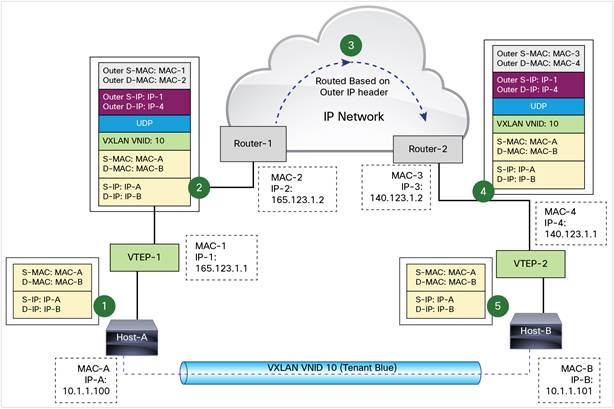
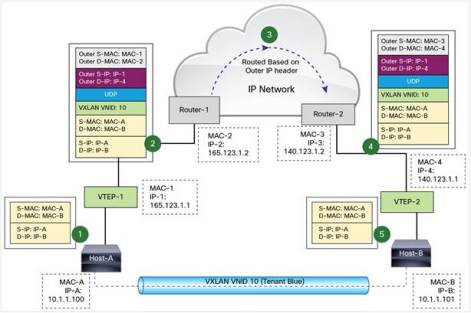
Some cut and paste info on how VXLAN works, more of a memory jogger and useful.
VXLAN uses stateless tunnels between VTEPs to transmit traffic of the overlay Layer 2 network through the Layer 3 transport network. The below is an example of a VXLAN packet forwarding taken from the Cisco VXLAN configuration guide for Nexus 9000 NS-OX
-
+
+
+
+
+
+
When optimizing encrypted MAPI traffic, normal encryption methods are maintained between the Outlook client and client-side Steelhead appliance, and the Exchange server and server-side Steelhead appliance.
To ensure the optimized MAPI connection between the two Steelhead appliances is also encrypted, configure RiOS Secure Inner Channel. For detail, see the Steelhead Appliance Deployment Guide.
To enable Outlook Anywhere optimisation it requires HTTPs Optimisation and SSL certificates to be installed. Once installed this allows the Riverbed devices to establish a Secure Inner Channel connection as per the below, thus allowing optimisation to occur.
Encrypted Connections between Client and Server

To enable the Steelhead appliance to optimize encrypted MAPI traffic between Outlook and the Exchange Server:
- On the server-side Steelhead appliance, choose Configure > Networking > Windows Domain.
- Join the server-side Steelhead appliance to the same Windows domain that the Exchange server belongs to and operates as a member server.
- Verify that Outlook is encrypting traffic.
- Enable the Encrypted Optimization option on client-side and server-side Steelhead appliances involved in optimizing MAPI encrypted traffic. Alternatively, use the CLI command protocol mapi encrypted enable.
- Ensure that both Enable AMPI Exchange 2003 and Enable MAPI Exchange 2007 Acceleration are enabled. In RiOSv6.1 and later, by default, these options are enabled.
- Restart the service on all Steelhead appliances that have the Encrypted Optimisation option enabled.
To Configure Outlook Anywhere
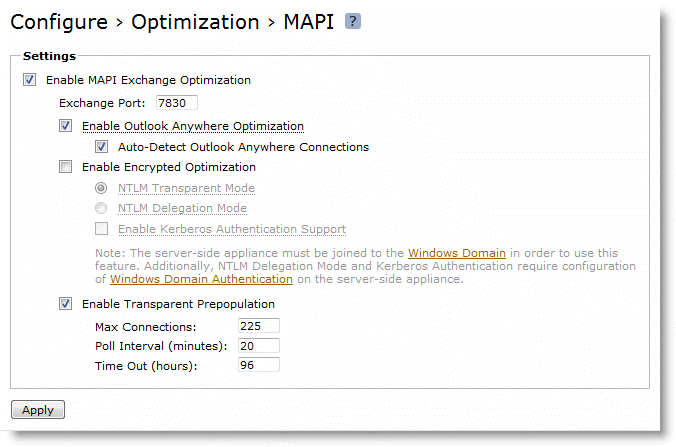
- Configure outlook Anywhere MAPI
- On the client-side and Server-Side Steelhead Applicance, choose Configure > Optimisation > MAPI.
- Select Enable Outlook Anywhere optimisation
- Select Auto-Detect Outlook Anywhere Connections
- Click Apply
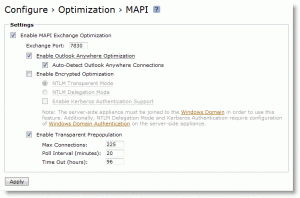
Note: The corresponding CLI commands are [no] protocol mapi outlook-anywhr enable and [no] protocol mapi outlook-anywhr auto-detect.
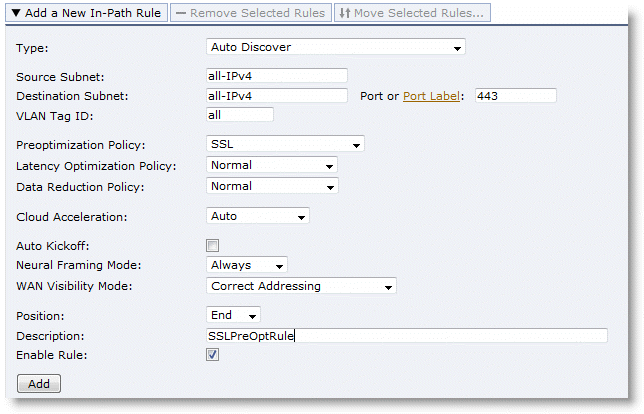
- Configure an in-path rule for HTTPS connections to enable SSL Pre-optimisation only if the SH has not had port 443 removed from the port label Secure. Normally port 443 is removed as part of the simple SSL configuration. For more details, see Setting up a Simple SSL Deployment.
To configure an in-path rule for HTTPS connections:
- Choose Configure > Optimization > In-Path Rules.
- Select Add a New In-Path Rule.
- Select Auto Discover from the Type drop-down list.
- Specify port 443.
- Select SSL from the Pre-optimization Policy drop-down list.
- Click Add.

Note: You can configure an in-path rule for HTTPS connections to enable SSL preoptimisation through the CLI by entering in-path rule auto-discover preoptimization ssl dstport 443 rulenum end description SSLPreOptRule.
- Enable HTTP optimization the client-side and server-side Steelhead appliance. For details, see HTTP Optimisation.
- Enable SSL the client-side and server-side Steelhead appliance. The certificate and key from the Outlook Anywhere server must be installed on the server-side Steelhead appliance.
- If you are using an internal CA, the CA root certificate must be installed.
- If you are using encrypted MAPI you must enable secure inner channel. For details, see MAPI Optimization.
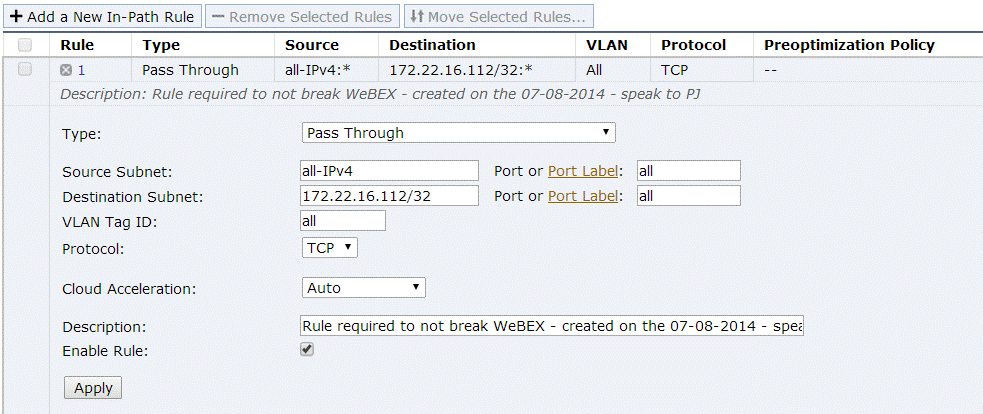
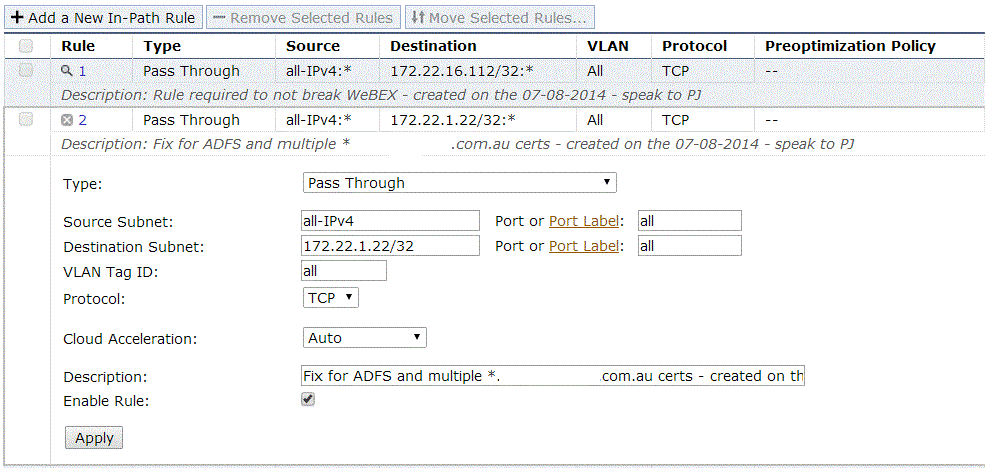
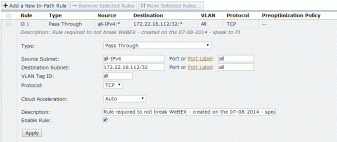
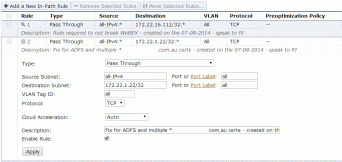
For some reason we have a duplication of Wildcard Cerficates, specifically for *.companyxyz.com.au
Due to this, it was necessary to create two additional rules on each client-side Steelhead deployment to ensure WebEx traffic and other ADFS traffic continued to work, albeit not optimised.
These rules are below.
-
+
+
+
+
+
+
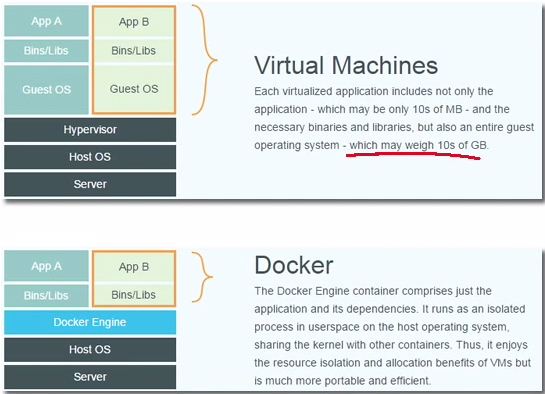
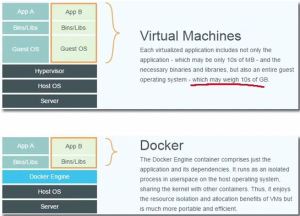
What is Docker?
It separates applications from infrastructure using container technology, similar to how virtual machines separate the O/S from bare metal.
Why Docker?
Build any app in any language using any stack
Dockerised Apps can be run anywhere on anything
Unites Developers & Sysadmins in the fight against dependency demons.
The tutorial will give you an idea of the basic commands and its application.
-
+
+
+
+
+
+
I’m looking forward to setting up a Nexus 9k Solution, L3 using VXLAN BGP EVPN Topology Dual DataCentre configuration. Aiming for a Live/Live Core between the two. Only caveat is we will stick to L2 supporting the Edge, for Internet and IPWAN connections using traditional technologies such as HSRP.
VXLAN BGP EVPN…..Configuration guide
-
+
+
+
+
+
+
Recent events with our local Data Centre hosting company’s capability (T3 my arse) has prompted me to gather some information and understand the connectivity between the HP Virtual Connect (BladeCenter) and our Cisco 6500 Chassis setup. HP Virtual Connect for the Cisco Network Administrator HP Virtual Connect 1Gb Ethernet Cookbook HP Virtual Connect for c-Class BladeSystem – User Guide HP Virtual Connect: Common Myths, Misperceptions, and Objections
-
+
+
+
+
+
+
Flow control is a feature defined in the IEEE 802.3x specification, enabling a receiving device to signal congestion to a sending device, which allows for the sending device to temporarily halt transmission, alleviating congestion at the receiving device
- Flow control— Some Fast Ethernet devices support flow control, where devices can send pause frames, which instruct the remote end to stop sending data for a specific period of time.
- Flow control— Flow control is important for gigabit Ethernet connections, where it is reasonable for the receive buffers on a gigabit interface to become full due to the high speeds of data transfer, causing congestion on the interface
Flow-control administration. Possible settings:
- On indicates the local port requires the far end to send flow control.
- Off indicates the local port does not allow the far end to send flow control.
- Desired indicates the local end allows the far end to send flow control.
Refer:
http://www.cisco.com/en/US/docs/ios/lanswitch/command/reference/lsw_s1.html#wp1071945
Regards,
-
+
+
+
+
+
+
Good summary of FlexConnect, nice and simple to understand.
This week I’m having talks with a client regarding wireless at his remote sites. As they are currently having autonomous access points on all these sites they are looking to change to controller based access points and are starting to ask questions like ‘Do I need a WLC on each site?’, ‘How many AP’s can I have on a remote site connecting back to a central WLC’ and ‘What happens when the WAN-link goes down?’. Hopefully the answers can be found in this post.
FlexConnect
FlexConnect is a wireless solution for branch office and remote office deployments. From a central Wireless LAN Controller (WLC), hopefully in your Data Centre with a redundant WLC not too far away, you can configure, control and manage access points in a branch or remote office. No need for a WLC in each office.
Switching Modes
There are two switching modes supported by FlexConnect AP’s:
View original post 795 more words
-
+
+
+
+
+
+
Over the last year i’ve really started to appreciate Aussie Hip Hop, here’s some of the best of 2013/14:





-
+
+
+
+
+
+
Some email software requires you to choose between POP/POP3 and IMAP protocol settings. As a rule of thumb, you should always choose IMAP if you’re planning to set up your email address on multiple devices (e.g. home computer, iPad and a smartphone). This ensures that all of your devices will get a copy of every email you receive.
A computer or device using POP protocol for an email account will often download emails from the mail server and then not leave a copy for other emails to download. For example, this means that once an email is downloaded to your desktop computer, you can’t download another copy on your smartphone.
Some email clients may have an additional setting to make POP accounts leave a copy of emails on the mail server, but this is not always the case.
If you only use a single computer, choosing POP should be fine.