-
+
+
+
+
+
+
-
+
+
+
+
+
+
-
+
+
+
+
+
+
-
Some rather useful documentation from the boys at Cisco, after some head bashing with these 9K configurations.
-
+
+
+
+
+
+
Some more useful VXLAN Design guide reading.
Configuring VXLAN BGP EVPN
RFC7348 – Virtual eXtensible Local Area Network
-
+
+
+
+
+
+
OK, this wasn’t quite as simple as i would have first thought but I got there in the end.
The version of Prime I was initially running was 2.0.0.0.39 and had to be upgraded before I could do a backup that would be compatible with 2.2.
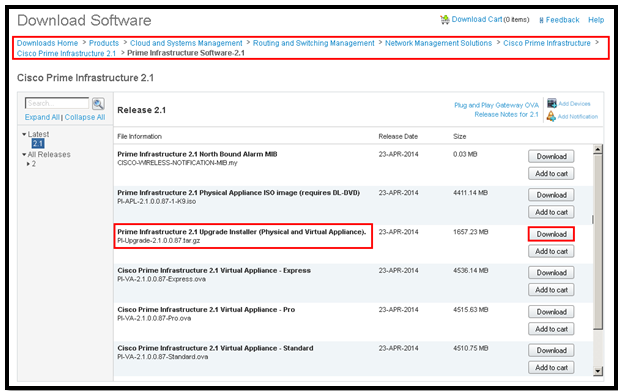
I upgraded 2.0.0.0.39 >> version 2.1 by downloading PI-Upgrade-2.1.0.0.87.gz from Cisco.com (from the below location)
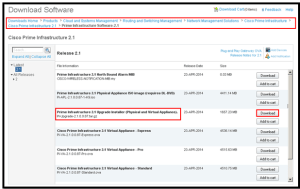
Once downloaded I dropped the file onto my FTP Server. This can be viewed from the PI Server by running the show repository ftpserver
First stop NCS by running ncs stop then run the following command:
application upgrade PI-Upgrade-2.1.0.0.87.gz ftpserver
This takes a while and at the end you will recieve a message ‘Application upgrade successful’, then you can restart NCS – ncs start
Once complete you can then backup your PI Server (using the Backup/Restore procedure) including configuration but most importantly all your historical data.
Then you can restore the PI-Backup to your new 2.2 instance of Prime 🙂 using the following command:
restore PIBackup-xxxxxx-xxxx.tar.gpg repository ftpserver application NCS
……..2hr:44m’s later she’s alive.
-
+
+
+
+
+
+
Project ‘Upgrade Cisco Prime’, requires i backup the Database using the below commands.
Cisco Prime Infrastructure 2.2 Admin Guide
Step 1 Open a CLI session with the Prime Infrastructure server (see Connecting Via CLI).
Step 2 Enter configuration mode:
PIServer/admin#configure terminalStep 3 Configure a symbolic link to the remote FTP server:
PIServer/admin(config)#repository repositoryNamePIServer/admin(config-Repository)#url ftp:// RemoteServerIP (needs to be an IP address)PIServer/admin(config-Repository)#user userName password plain userPasswordPIServer/admin(config-Repository)#exit- repositoryName is the name of the repository (for example:
MyRepoorPrimeInfrastructure). - RemoteServerIP is the IP address of the FTP server hosting the shared backup folder.
- userName is the name of a user with write privileges to the repository on the FTP server.
- userPassword is the corresponding password for that user.
Step 4 Verify creation of the symbolic link:
PIServer/admin#show repository repositoryNameStep 5 When taking backups at the command line, specify the new remote FTP repository as the repository name in the backup command. For example:
PIServer/admin# backup MyBackupFileName repository MyRepo application NCSIf you want to perform backups automatically, select the repository name you created as the repository name in the Prime Infrastructure web interface.
- repositoryName is the name of the repository (for example:
-
+
+
+
+
+
+
-
+
+
+
+
+
+
cognitive dissonance
What you are experiencing are the classic symptoms of cognitive dissonance. You are faced with two competing and contradictory facts — convinced on the one hand that Apple products suck, but yet millions and millions of people buy them. Rather than acknowledging that *maybe* you’re wrong, you instead explain-away the contradiction by referring to all those people as “sheep”.
So is it more plausible that you’re right and millions and millions of other people are wrong, or the other way around?
-
Subscribe
Subscribed
Have a WordPress.com account? Log in now.

