Some more useful VXLAN Design guide reading.
Configuring VXLAN BGP EVPN
RFC7348 – Virtual eXtensible Local Area Network
If you're not making mistakes, then you're not doing anything.
+
+
+
+
+
+
Some more useful VXLAN Design guide reading.
Configuring VXLAN BGP EVPN
RFC7348 – Virtual eXtensible Local Area Network
+
+
+
+
+
+
OK, this wasn’t quite as simple as i would have first thought but I got there in the end.
The version of Prime I was initially running was 2.0.0.0.39 and had to be upgraded before I could do a backup that would be compatible with 2.2.
I upgraded 2.0.0.0.39 >> version 2.1 by downloading PI-Upgrade-2.1.0.0.87.gz from Cisco.com (from the below location)
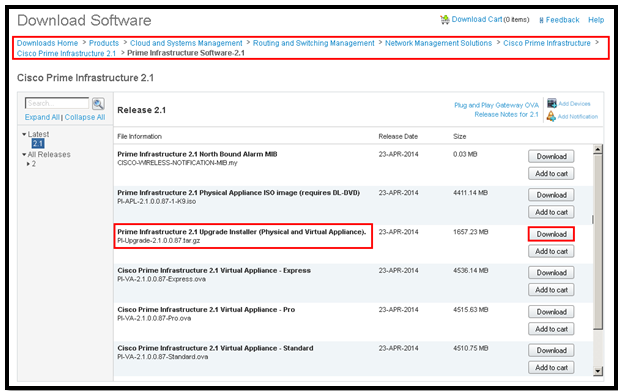
Once downloaded I dropped the file onto my FTP Server. This can be viewed from the PI Server by running the show repository ftpserver
First stop NCS by running ncs stop then run the following command:
application upgrade PI-Upgrade-2.1.0.0.87.gz ftpserver
This takes a while and at the end you will recieve a message ‘Application upgrade successful’, then you can restart NCS – ncs start
Once complete you can then backup your PI Server (using the Backup/Restore procedure) including configuration but most importantly all your historical data.
Then you can restore the PI-Backup to your new 2.2 instance of Prime 🙂 using the following command:
restore PIBackup-xxxxxx-xxxx.tar.gpg repository ftpserver application NCS
……..2hr:44m’s later she’s alive.
+
+
+
+
+
+
Project ‘Upgrade Cisco Prime’, requires i backup the Database using the below commands.
Cisco Prime Infrastructure 2.2 Admin Guide
Step 1 Open a CLI session with the Prime Infrastructure server (see Connecting Via CLI).
Step 2 Enter configuration mode:
PIServer/admin# configure terminal
Step 3 Configure a symbolic link to the remote FTP server:
PIServer/admin(config)# repository repositoryName
PIServer/admin(config-Repository)# url ftp:// RemoteServerIP (needs to be an IP address)
PIServer/admin(config-Repository)# user userName password plain userPassword
PIServer/admin(config-Repository)# exit
MyRepo or PrimeInfrastructure).Step 4 Verify creation of the symbolic link:
PIServer/admin# show repository repositoryName
Step 5 When taking backups at the command line, specify the new remote FTP repository as the repository name in the backup command. For example:
PIServer/admin# backup MyBackupFileName repository MyRepo application NCS
If you want to perform backups automatically, select the repository name you created as the repository name in the Prime Infrastructure web interface.
+
+
+
+
+
+
+
+
+
+
+
+
cognitive dissonance
What you are experiencing are the classic symptoms of cognitive dissonance. You are faced with two competing and contradictory facts — convinced on the one hand that Apple products suck, but yet millions and millions of people buy them. Rather than acknowledging that *maybe* you’re wrong, you instead explain-away the contradiction by referring to all those people as “sheep”.
So is it more plausible that you’re right and millions and millions of other people are wrong, or the other way around?
+
+
+
+
+
+
1. Recognise the “isness” of any situation.
2. Do what you can to improve it.
3. Accept everything that you can’t change.
4. Deliberately think about (and do) what makes you happy.
5. Do not be distracted by external situations, they’re only perceptions anyway, and
6. Alter them by our very carefully chosen thoughts and related actions.
+
+
+
+
+
+
Some cut and paste info on how VXLAN works, more of a memory jogger and useful.
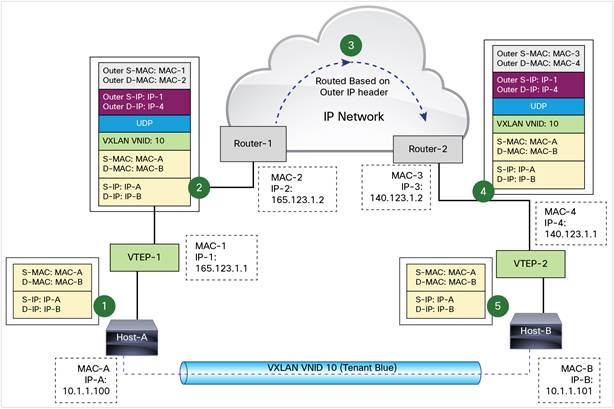
VXLAN uses stateless tunnels between VTEPs to transmit traffic of the overlay Layer 2 network through the Layer 3 transport network. The below is an example of a VXLAN packet forwarding taken from the Cisco VXLAN configuration guide for Nexus 9000 NS-OX
+
+
+
+
+
+
When optimizing encrypted MAPI traffic, normal encryption methods are maintained between the Outlook client and client-side Steelhead appliance, and the Exchange server and server-side Steelhead appliance.
To ensure the optimized MAPI connection between the two Steelhead appliances is also encrypted, configure RiOS Secure Inner Channel. For detail, see the Steelhead Appliance Deployment Guide.
To enable Outlook Anywhere optimisation it requires HTTPs Optimisation and SSL certificates to be installed. Once installed this allows the Riverbed devices to establish a Secure Inner Channel connection as per the below, thus allowing optimisation to occur.
Encrypted Connections between Client and Server

To enable the Steelhead appliance to optimize encrypted MAPI traffic between Outlook and the Exchange Server:
To Configure Outlook Anywhere
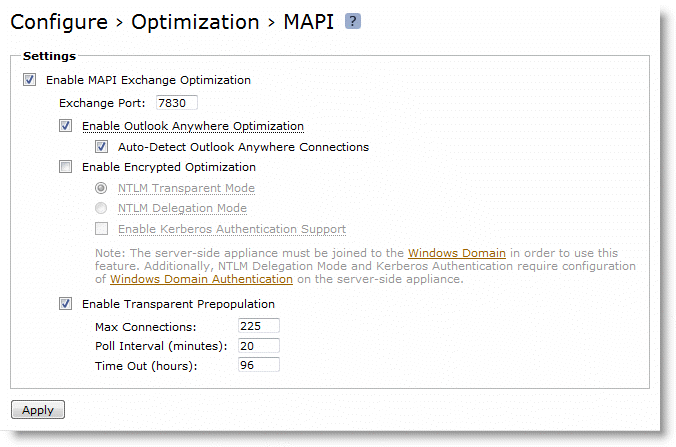
Note: The corresponding CLI commands are [no] protocol mapi outlook-anywhr enable and [no] protocol mapi outlook-anywhr auto-detect.
To configure an in-path rule for HTTPS connections:
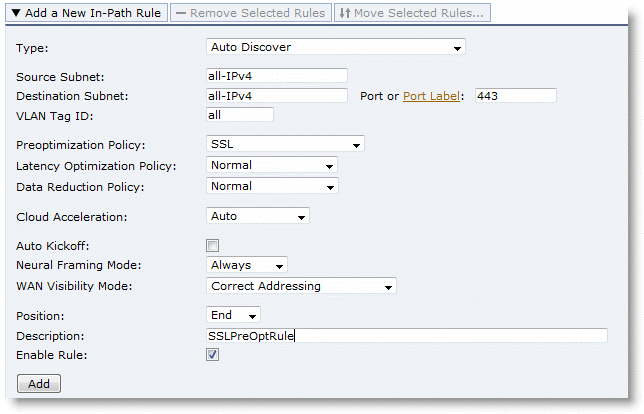
Note: You can configure an in-path rule for HTTPS connections to enable SSL preoptimisation through the CLI by entering in-path rule auto-discover preoptimization ssl dstport 443 rulenum end description SSLPreOptRule.
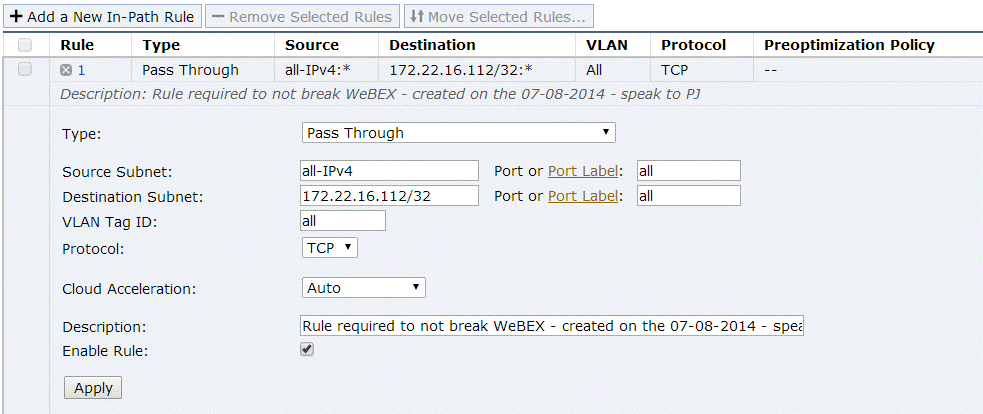
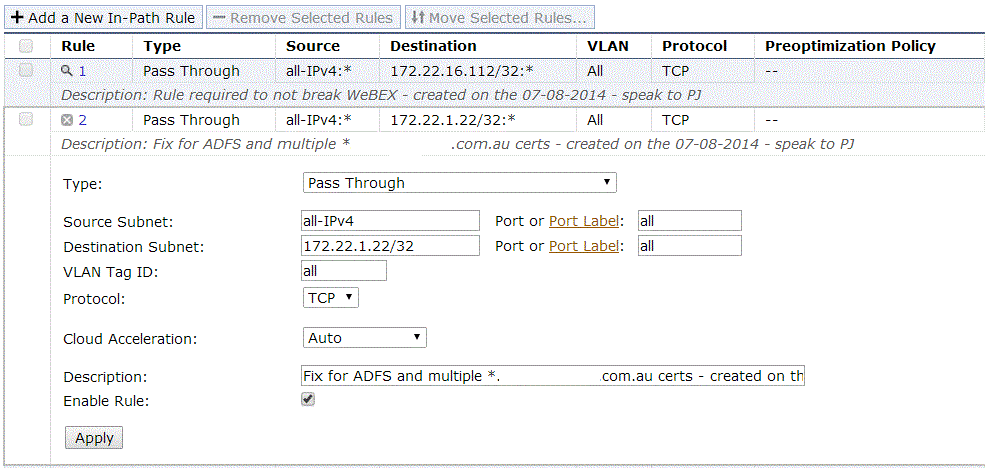
For some reason we have a duplication of Wildcard Cerficates, specifically for *.companyxyz.com.au
Due to this, it was necessary to create two additional rules on each client-side Steelhead deployment to ensure WebEx traffic and other ADFS traffic continued to work, albeit not optimised.
These rules are below.
+
+
+
+
+
+
What is Docker?
It separates applications from infrastructure using container technology, similar to how virtual machines separate the O/S from bare metal.
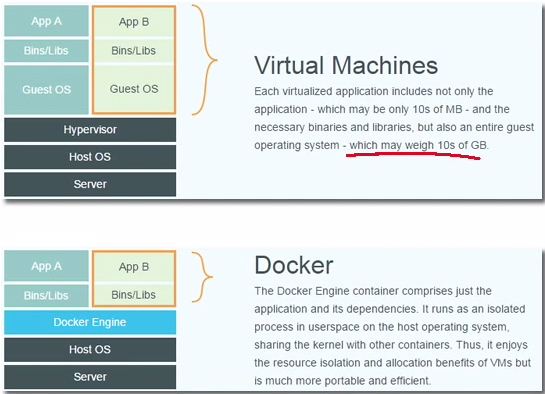
Why Docker?
Build any app in any language using any stack
Dockerised Apps can be run anywhere on anything
Unites Developers & Sysadmins in the fight against dependency demons.
The tutorial will give you an idea of the basic commands and its application.
 MystaJoneS