MystaJoneS

If you're not making mistakes, then you're not doing anything.

  • I’m looking forward to setting up a Nexus 9k Solution, L3 using VXLAN BGP EVPN Topology Dual DataCentre configuration. Aiming for a Live/Live Core between the two. Only caveat is we will stick to L2 supporting the Edge, for Internet and IPWAN connections using traditional technologies such as HSRP.

    VXLAN BGP EVPN…..Configuration guide

    + , ,
  • Recent events with our local Data Centre hosting company’s capability (T3 my arse) has prompted me to gather some information and understand the connectivity between the HP Virtual Connect (BladeCenter) and our Cisco 6500 Chassis setup. HP Virtual Connect for the Cisco Network Administrator HP Virtual Connect 1Gb Ethernet Cookbook HP Virtual Connect for c-Class BladeSystem – User Guide HP Virtual Connect: Common Myths, Misperceptions, and Objections

    + ,
  • Flow control is a feature defined in the IEEE 802.3x specification, enabling a receiving device to signal congestion to a sending device, which allows for the sending device to temporarily halt transmission, alleviating congestion at the receiving device

    • Flow control— Some Fast Ethernet devices support flow control, where devices can send pause frames, which instruct the remote end to stop sending data for a specific period of time.
    • Flow control— Flow control is important for gigabit Ethernet connections, where it is reasonable for the receive buffers on a gigabit interface to become full due to the high speeds of data transfer, causing congestion on the interface

    Flow-control administration. Possible settings:

    1. On indicates the local port requires the far end to send flow control.
    2. Off indicates the local port does not allow the far end to send flow control.
    3. Desired indicates the local end allows the far end to send flow control.

    Refer:

    http://www.cisco.com/en/US/docs/ios/lanswitch/command/reference/lsw_s1.html#wp1071945

    Regards,

    + ,
  • Good summary of FlexConnect, nice and simple to understand.

    jacquesvanderwesthuizeninoz's avatarWLAN Lessons Learned

    This week I’m having talks with a client regarding wireless at his remote sites. As they are currently having autonomous access points on all these sites they are looking to change to controller based access points and are starting to ask questions like ‘Do I need a WLC on each site?’, ‘How many AP’s can I have on a remote site connecting back to a central WLC’ and ‘What happens when the WAN-link goes down?’. Hopefully the answers can be found in this post.

    FlexConnect

    FlexConnect is a wireless solution for branch office and remote office deployments. From a central Wireless LAN Controller (WLC), hopefully in your Data Centre with a redundant WLC not too far away, you can configure, control and manage access points in a branch or remote office. No need for a WLC in each office.

    Switching Modes 

    There are two switching modes supported by FlexConnect AP’s:

    View original post 795 more words

    +
  • Over the last year i’ve really started to appreciate Aussie Hip Hop, here’s some of the best of 2013/14:

    HillTopHoods Illy  bliss-n-eso-circus-sky-final-cover

    360SplitSyndicateSeth

    +
  • Some email software requires you to choose between POP/POP3 and IMAP protocol settings. As a rule of thumb, you should always choose IMAP if you’re planning to set up your email address on multiple devices (e.g. home computer, iPad and a smartphone). This ensures that all of your devices will get a copy of every email you receive.

    A computer or device using POP protocol for an email account will often download emails from the mail server and then not leave a copy for other emails to download. For example, this means that once an email is downloaded to your desktop computer, you can’t download another copy on your smartphone.

    Some email clients may have an additional setting to make POP accounts leave a copy of emails on the mail server, but this is not always the case.

    If you only use a single computer, choosing POP should be fine.

    +
  • Some information on how to configure multiprotocol extended Border Gateway Protocol (MP-EBGP). Extended BGP allows for the transport of routing information for multiple network layer protocols IPv6, VPNv4, and others. MP-BGP allows you to have a unicast routing topology different from a multicast routing topology, which helps to control the network and resources.

    In this example, the R1 and R3 routers are configured to be in AS 5500 forming iBGP. The R2 router is configured to be in AS 6500. The R1 and R2 routers communicate with each other using MP-EBGP.

    MP-BGP Config

    + , ,
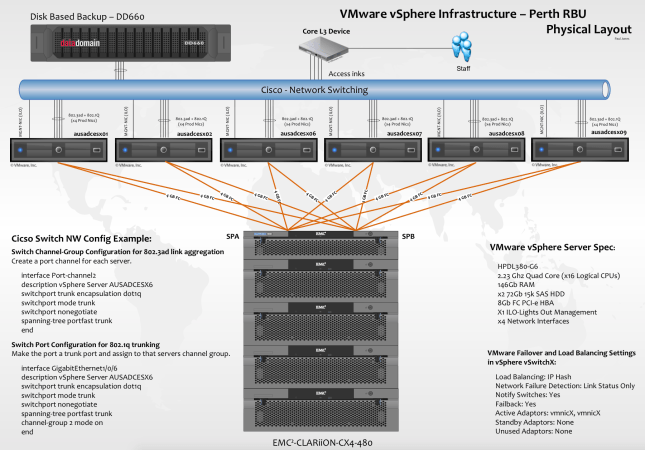
  • Configuration I designed some years back running VMware, EMC and DataDomain with some good old Cisco networking.  Pretty nice setup, if i don’t say so myself.

    Screen Shot 2015-01-05 at 7.35.17 pm


    Cisco switch config supporting 802.3ad and 802.1q.

    + ,
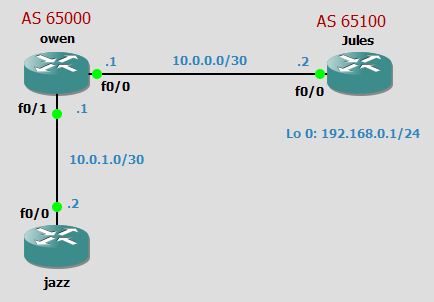
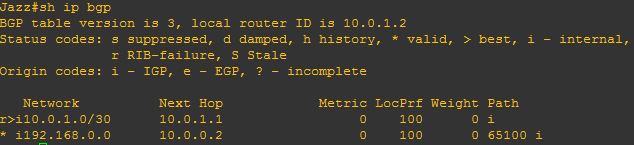
  • From the below you can see the next hop for 192.168.0.0 network is 10.0.0.2 which is outsite of 65000 AS, and router jazz doesn’t have a route to it.  BGP will not put 192.168.0.0 into routing table because it doesn’t know how to reach next hop, you can see this below:

    BGP-Next Hp Self 2

    BGP-Next Hp Self 3

    BGP-Next Hp Self 4

    By adding the next-hop-self command on the router owen it will change the next-hop attribute for external networks that will be advertised to the router Jazz:

    owen(config-router)#neighbour 10.0.1.2 next-hop-self

    BGP-Next Hp Self 4.5

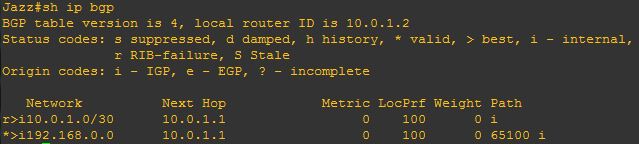
    This changes the next hop attribute from 10.0.0.2 to be 10.0.1.1 on the router owen

    BGP-Next Hp Self 5

    from Jazz you can now ping (192.168.0.1) on Jules.

    BGP-Next Hp Self 6

    Job done!

    +
  • Loading a topology in GNS3 can consume a massive amount of CPU.  To decrease the CPU usage and make the GNS3 experince bearable i carried out the following steps:

    Load a Router/IOS >  Start it and open a terminal.

    At this point select the Idle-PC value and let the PC decide the option for each IOS image independently.  I did this for each IOS, i also changed the Idlemax value = 100 too. Idle-PC Value

    + ,